
Lunch Time Timer+LiveView3.2 - Get APK
You'll be able to download in few seconds.
Publisher Description
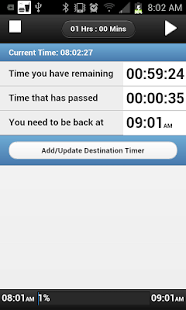
Lunch Time Timer is a great app for helping you to keep track of your lunch time!
Main Features
- One click to start your Timer
- Easily adjust your lunch time. (Your Lunch time is saved for the next day)
- Running to the store or going out for lunch? Add a stop timer when you reach your destination and Lunch Time Timer will let you know what time to leave to get back.
- Notification keeps you updated on how much time you have left.
- Notification image now updates you to
Lunch Time Timer displays:
- The time you need to be back
- How much time until you need to be back
- How long you have been out already
For Stop Timers:
- Tracks what time you need to leave your stop
- How much time it is going to take you to get back
- How long you have until you need to leave your stop
LiveView Support:
- Open the LiveView plugin and start your timer from your LiveView
- Click on the down button to add a stop timer
SmartWatch 2 notes:
- The display will automatically dim in to low power mode.
SmartWatch Support:
- open the smartwatch plugin and click the start button
- once a timer is started you can add a destination by clicking the add destination button.
I hope you all enjoy this app, and please let me know if anyone has any issues!!
Check out more great apps from Dynamic Upgrade
============================================
In App Purchase is used to remove ads.
============================================
Lunch Time Timer's Permissions explained:
============================================
NETWORK COMMUNICATION (Full Network Access)
- While we love making apps here, we need to generate some revenue to keep going. This permission is just used to serve small, unobtrusive ads nothing more.
Previous updates:
6/17/2013
----------------
- Fixes the issue with the destination timer not showing up on the LiveView
6/16/2013
----------------
- Apparently timers were being lost because of an issue with the Android operating system. This should fix the issue!
6/15/2013
----------------
- Now when a timer is running if you click on stop, start or update destination you will get a prompt asking if you want to perform the action. This will fix the issue of accidentally clicking on a button. You may now click freely :)
- Updated the liveview so that if a timer is running or a destination time is set, clicking the start time or set destination buttons will not override your current time settings
- Added vibration when timer ends
6/1/2013
-----------------
- Several layout updates for the app and LiveView
- Added arrows to LiveView so you know which buttons to click
- Fixed an issue that was allowing the time to be set to 00:00. Now defaults to 1 hour if set to 00:00
tags: LiveView, liveview, sony ericsson, liveview plugin, live view plugin
Extends:com.sonyericsson.extras.liveview
LiveWare extension for SmartWatch
LiveWare™ extension for SmartWatch
LiveWare extension for SmartWatch 2
Smart Connect extension for SmartWatch 2
About Lunch Time Timer+LiveView
The company that develops Lunch Time Timer+LiveView is Dynamic Upgrade. The latest version released by its developer is 3.2.
To install Lunch Time Timer+LiveView on your Android device, just click the green Continue To App button above to start the installation process. The app is listed on our website since 2014-03-23 and was downloaded 0 times. We have already checked if the download link is safe, however for your own protection we recommend that you scan the downloaded app with your antivirus. Your antivirus may detect the Lunch Time Timer+LiveView as malware as malware if the download link to com.dynamicu.lunchtimetimer is broken.
How to install Lunch Time Timer+LiveView on your Android device:
- Click on the Continue To App button on our website. This will redirect you to Google Play.
- Once the Lunch Time Timer+LiveView is shown in the Google Play listing of your Android device, you can start its download and installation. Tap on the Install button located below the search bar and to the right of the app icon.
- A pop-up window with the permissions required by Lunch Time Timer+LiveView will be shown. Click on Accept to continue the process.
- Lunch Time Timer+LiveView will be downloaded onto your device, displaying a progress. Once the download completes, the installation will start and you'll get a notification after the installation is finished.
Program Details
System requirements
Download information
Pricing
Version History
version 3.2
posted on 2014-03-23
version 1.19
posted on 2013-06-17
Several fixes and updates
Disclaimer
External Download
We do not host Lunch Time Timer+LiveView on our servers. We did not scan it for viruses, adware, spyware or other type of malware. This app is hosted by Galad and passed their terms and conditions to be listed there. We recommend caution when installing it.
The APK Download link for Lunch Time Timer+LiveView is provided to you by apps112.com without any warranties, representations or guarantees of any kind, so access it at your own risk.
If you have questions regarding this particular app contact the publisher directly. For questions about the functionalities of apps112.com contact us.
